A rich terminal chat client for OpenRouter models. Conversation persistence, file attachments, exports (Markdown / JSON / HTML), cost tracking, and a friendly command interface.
Overview
oAI is a terminal-based chat interface to OpenRouter (https://openrouter.ai) designed to make interactive model usage pleasant in the terminal. It features:
Interactive chat
Persistent session history, system prompts and model switching.
Conversation management
Save/load/delete conversations in SQLite (oai_config.db).
File attachments
Attach code files, PDFs and images using the @/path/to/file syntax.
Export
Export conversations as Markdown, JSON or standalone HTML.
Cost & credits
Estimates cost per message and queries account credits via OpenRouter.
Rich terminal UI
Uses rich, prompt_toolkit and syntax-aware layouts.
First run: you'll be prompted to enter your OpenRouter API key (persisted in the app DB). You can also set it later with /config api.
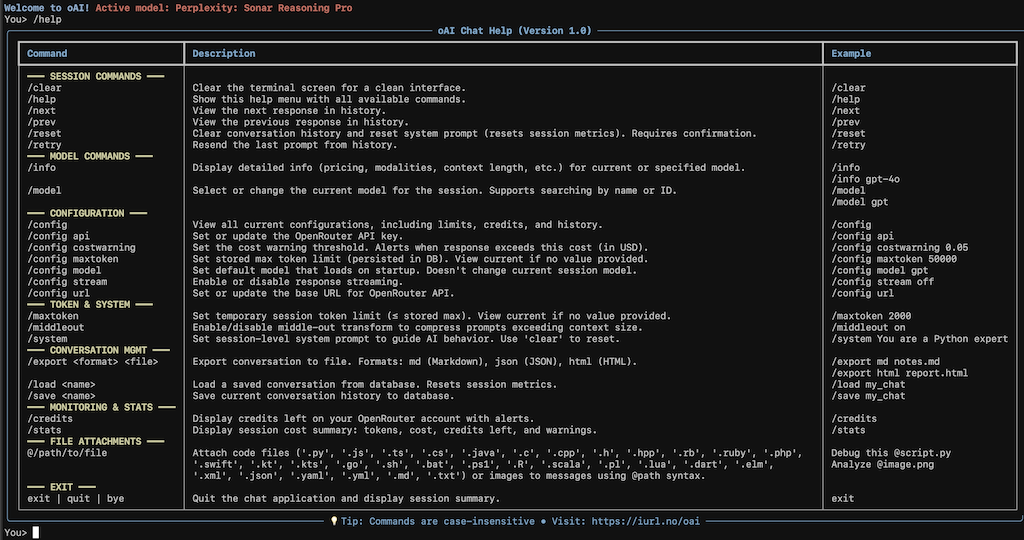
Screenshot
Install
Minimal steps to get running locally.
Clone & setup
Download from the release page.

# Unzip and go to folder

python3 -m venv .venv
source .venv/bin/activate
pip install -r requirements.txt
chmod +x oai.py

# Optional: copy to a PATH location
mkdir -p ~/.local/bin
cp oai.py ~/.local/bin/oai
Paste clipboard contents to the model (uses pyperclip).
exit | quit
Exit the app; session summary is logged.
Notes: The app stores settings & conversations under ~/.config/oai/ (DB, history.txt, oai.log).
Examples & Patterns
1) Paste clipboard content and add a prompt
/paste Explain this function
# The app will paste clipboard contents and send them with your prompt.
2) Attach a code file for debugging
Debug this script @/home/user/projects/myscript.py
3) Parallel example: multi-step flow
You> Summarize README and list next steps.
You> /save meeting_notes
You> /export html meeting_notes.html
4) Export conversation as HTML
Export command
/export html my_session_report.html
The app provides three export formats: md, json, and html. The HTML export is a standalone file with basic styling — useful for sharing or archiving conversations.
Export, Storage & Logs
Storage paths (default):
~/.config/oai/oai_config.db
SQLite DB storing config and saved conversations.
~/.config/oai/history.txt
Prompt history used by prompt_toolkit.
~/.config/oai/oai.log
Application logs (rich-powered formatting).
Export formats
Markdown — good for note-taking and versioning.
JSON — machine-readable, includes metadata and messages.
HTML — standalone, styled export suitable for sharing.
Example: programmatic export
# inside the app:
# /export md conversation.md
Advanced / Tips
Streaming — Toggle streaming with /config stream on|off (helps when you want chunked streaming responses).
Token limits — Set a stored max with /config maxtoken <value> and session max with /maxtoken <value>.
Cost warnings — Configure a threshold with /config costwarning <amount>. The app estimates cost per message and checks account credits.
Middle-out transform — Enable with /middleout on to compress long prompts while preserving structure.
System prompt — Use /system <prompt> to set a session-level system prompt (guides the assistant).
File size limits — Files > 10MB are rejected to avoid sending huge payloads.